Kylin Configuration
- Configuration Files and Overriding
- Deployment configuration
- Metastore Configuration
- Modeling Configuration
- Hive Client and SparkSQL
- JDBC Datasource Configuration
- Data Type Precision
- Cube Design
- Cube Size Estimation
- Cube Algorithm
- Auto Merge Segments
- Lookup Table Snapshot
- Build Cube
- Dictionary-related
- Deal with Ultra-High-Cardinality Columns
- Spark as Build Engine
- Submit Spark jobs via Livy
- Spark Dynamic Allocation
- Job-related
- Enable Email Notification
- Enable Cube Planner
- HBase Storage
- Secondary Hbase Storage
- Job Output
- Enable Compression
- Real-time OLAP
- Storage Clean up Configuration
- Query Configuration
- Security Configuration
- Distributed query cache with Memcached
Configuration Files and Overriding
This section introduces Kylin's configuration files and how to perform Configuration Overriding.
Kylin Configuration Files
Kylin will automatically read the Hadoop configuration (core-site.xml), Hive configuration (hive-site.xml) and HBase configuration (hbase-site.xml) from the environment, in addition, Kylin's configuration files are in the $KYLIN_HOME/conf/ directory.
Kylin's configuration file is as follows:
kylin_hive_conf.xml: This file contains the configuration for the Hive job.kylin_job_conf.xml&kylin_job_conf_inmem.xml: This file contains configuration for the MapReduce job. When performing the In-mem Cubing job, user need to request more memory for the mapper inkylin_job_conf_inmem.xmlkylin-kafka-consumer.xml: This file contains the configuration for the Kafka job.kylin-server-log4j.properties: This file contains the log configuration for the Kylin server.kylin-tools-log4j.properties: This file contains the log configuration for the Kylin command line.setenv.sh: This file is a shell script for setting environment variables. Users can adjust the size of the Kylin JVM stack withKYLIN_JVM_SETTINGSand set other environment variables such asKAFKA_HOME.kylin.properties: This file contains Kylin global configuration.
Configuration Overriding
Some configuration files in $KYLIN_HOME/conf/ can be overridden in the Web UI. Configuration Overriding has two scope: Project level and Cube level. The priority order can be stated as: Cube level configurations > Project level configurations > configuration files.
Project-level Configuration Overriding
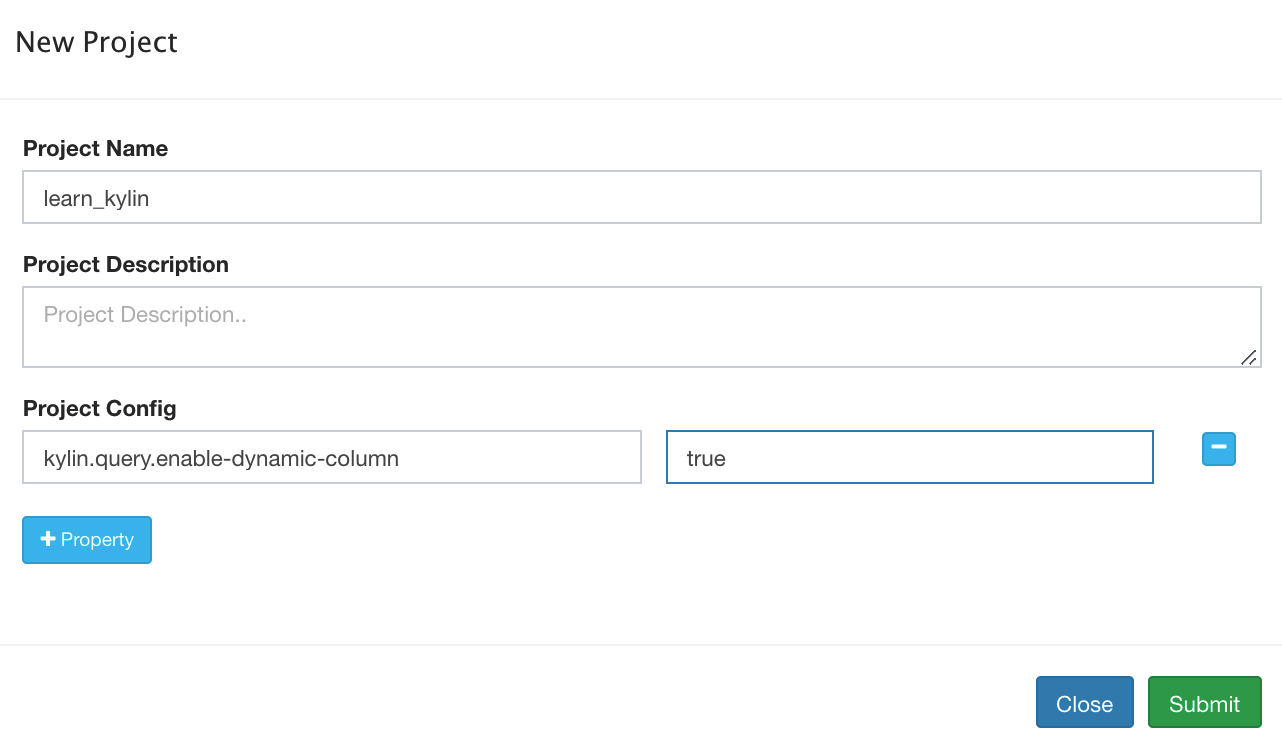
Click Manage Project in the web UI interface, select a project, click Edit -> Project Config -> + Property to add configuration properties which could override property values in configuration files, as the figure below shown,
Cube-level Configuration Overriding
In the Configuration overrides step of Cube Designer, user could rewrite property values to override those in project level and configuration files, as the figure below shown,
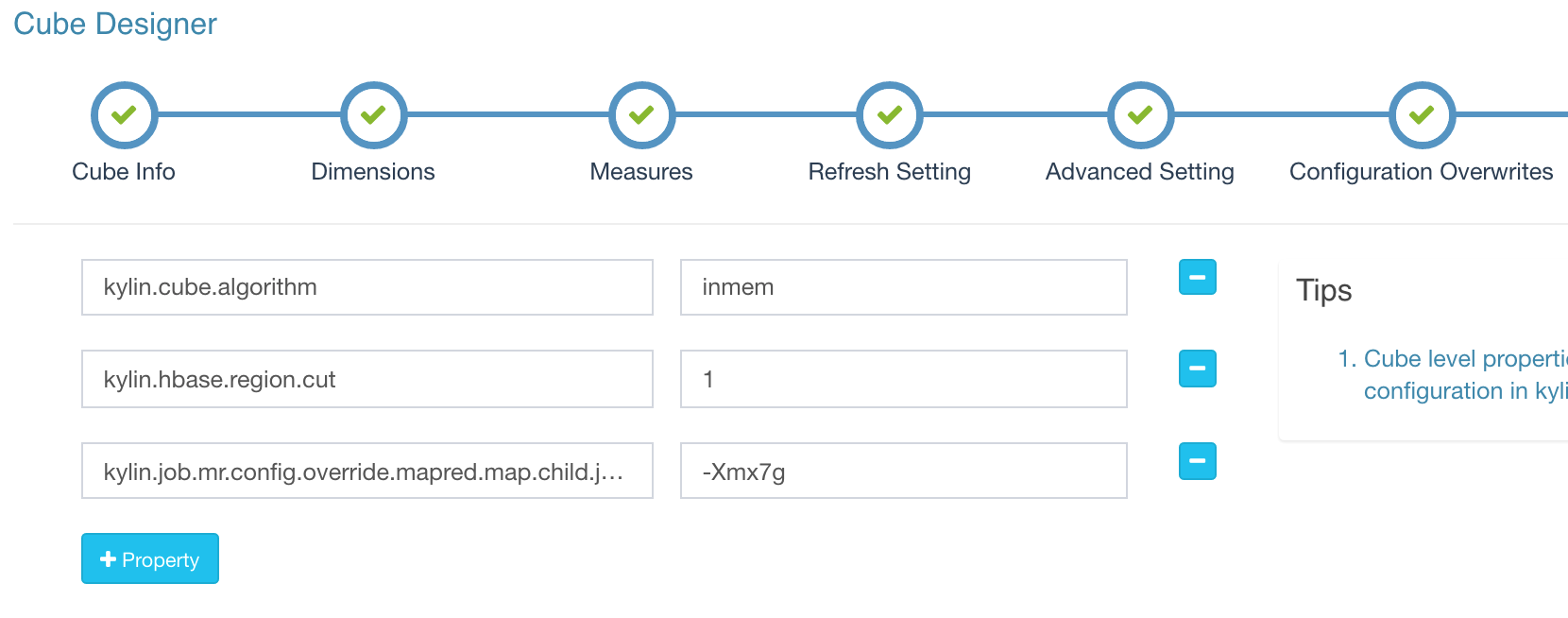
The following configurations can be override in the Cube-level,
kylin.cube.size-estimate*kylin.cube.algorithm*kylin.cube.aggrgroup*kylin.metadata.dimension-encoding-max-lengthkylin.cube.max-building-segmentskylin.cube.is-automerge-enabledkylin.job.allow-empty-segmentkylin.job.sampling-percentagekylin.source.hive.redistribute-flat-tablekylin.engine.spark*kylin.query.skip-empty-segments
MapReduce Configuration Overriding
Kylin supports overriding configuration properties in kylin_job_conf.xml and kylin_job_conf_inmem.xml at the project and cube level, in the form of key-value pairs, in the following format:
kylin.engine.mr.config-override.<key> = <value>
- If user wants getting more memory from YARN for jobs, user can set:
kylin.engine.mr.config-override.mapreduce.map.java.opts=-Xmx7gandkylin.engine.mr.config-override.mapreduce.map.memory.mb=8192 - If user wants the cube's build job to use a different YARN resource queue, user can set:
kylin.engine.mr.config-override.mapreduce.job.queuename={queueName}
Hive Configuration Overriding
Kylin supports overriding configuration properties in kylin_hive_conf.xml at the project and cube level, in the form of key-value pairs, in the following format:
kylin.source.hive.config-override.<key> = <value>
If user wants Hive to use a different YARN resource queue, user can set:
kylin.source.hive.config-override.mapreduce.job.queuename={queueName}
Spark Configuration Overriding
Kylin supports overriding configuration properties in kylin.properties at the project and cube level, in the form of key-value pairs, in the following format:
kylin.engine.spark-conf.<key> = <value>
If user wants Spark to use a different YARN resource queue, user can set:
kylin.engine.spark-conf.spark.yarn.queue={queueName}
Deployment configuration
This section introduces Kylin Deployment related configuration.
Deploy Kylin
kylin.env.hdfs-working-dir: specifies the HDFS path used by Kylin service. The default value is/kylin. Make sure that the user who starts the Kylin instance has permission to read and write to this directory.kylin.env: specifies the purpose of the Kylin deployment. Optional values includeDEV,QAandPROD. The default value is DEV. Some developer functions will be enabled in DEV mode.kylin.env.zookeeper-base-path: specifies the ZooKeeper path used by the Kylin service. The default value is/kylinkylin.env.zookeeper-connect-string: specifies the ZooKeeper connection string. If it is empty, use HBase's ZooKeeperkylin.env.hadoop-conf-dir: specifies the Hadoop configuration file directory. If not specified, getHADOOP_CONF_DIRin the environment.kylin.server.mode: Optional values includeall,jobandquery, among them all is the default one. job mode means the instance schedules Cube job only; query mode means the instance serves SQL queries only; all mode means the instance handles both of them.kylin.server.cluster-name: specifies the cluster name
Allocate More Memory for Kylin
There are two sample settings for KYLIN_JVM_SETTINGS are given in $KYLIN_HOME/conf/setenv.sh.
The default setting use relatively less memory. You can comment it and then uncomment the next line to allocate more memory for Kyligence Enterprise. The default configuration is:
Export KYLIN_JVM_SETTINGS="-Xms1024M -Xmx4096M -Xss1024K -XX`MaxPermSize=512M -verbose`gc -XX`+PrintGCDetails -XX`+PrintGCDateStamps -Xloggc`$KYLIN_HOME/logs/kylin.gc.$$ -XX`+UseGCLogFileRotation - XX`NumberOfGCLogFiles=10 -XX`GCLogFileSize=64M"
# export KYLIN_JVM_SETTINGS="-Xms16g -Xmx16g -XX`MaxPermSize=512m -XX`NewSize=3g -XX`MaxNewSize=3g -XX`SurvivorRatio=4 -XX`+CMSClassUnloadingEnabled -XX`+CMSParallelRemarkEnabled -XX`+UseConcMarkSweepGC -XX `+CMSIncrementalMode -XX`CMSInitiatingOccupancyFraction=70 -XX`+UseCMSInitiatingOccupancyOnly -XX`+DisableExplicitGC -XX`+HeapDumpOnOutOfMemoryError -verbose`gc -XX`+PrintGCDetails -XX`+PrintGCDateStamps -Xloggc`$KYLIN_HOME/logs/kylin.gc. $$ -XX`+UseGCLogFileRotation -XX`NumberOfGCLogFiles=10 -XX`GCLogFileSize=64M"
Job Engine HA
kylin.job.scheduler.default=2: to enable the distributed job scheduler.kylin.job.lock=org.apache.kylin.storage.hbase.util.ZookeeperJobLock: to enable distributed job lock
Note: For more information, please refer to the Enable Job Engine HA section in Deploy in Cluster Mode
Job Engine Safemode
Safemode can be only used in default schedule.
kylin.job.scheduler.safemode=TRUE: to enable job scheduler safemode. In safemode, Newly submitted job will not be executedkylin.job.scheduler.safemode.runable-projects=project1,project2: provide list of projects as exceptional case in safemode.
Read/Write Separation
kylin.storage.hbase.cluster-fs: specifies the HDFS file system of the HBase clusterkylin.storage.hbase.cluster-hdfs-config-file: specifies HDFS configuration file pointing to the HBase cluster
Note: For more information, please refer to Deploy Apache Kylin with Standalone HBase Cluster
RESTful Webservice
kylin.web.timezone: specifies the time zone used by Kylin's REST service. The default value is GMT+8.kylin.web.cross-domain-enabled: whether cross-domain access is supported. The default value is TRUEkylin.web.export-allow-admin: whether to support administrator user export information. The default value is TRUEkylin.web.export-allow-other: whether to support other users to export information. The default value is TRUEkylin.web.dashboard-enabled: whether to enable Dashboard. The default value is FALSE
Metastore Configuration
This section introduces Kylin Metastore related configuration.
Metadata-related
kylin.metadata.url: specifies the Metadata path. The default value is kylin_metadata@hbasekylin.metadata.dimension-encoding-max-length: specifies the maximum length when the dimension is used as Rowkeys with fix_length encoding. The default value is 256.kylin.metadata.sync-retries: specifies the number of Metadata sync retries. The default value is 3.kylin.metadata.sync-error-handler: The default value is DefaultSyncErrorHandlerkylin.metadata.check-copy-on-write: whether clear metadata cache, default value is FALSEkylin.metadata.hbase-client-scanner-timeout-period: specifies the total timeout between the RPC call initiated by the HBase client. The default value is 10000 (ms).kylin.metadata.hbase-rpc-timeout: specifies the timeout for HBase to perform RPC operations. The default value is 5000 (ms).kylin.metadata.hbase-client-retries-number: specifies the number of HBase retries. The default value is 1 (times).kylin.metadata.resource-store-provider.jdbc: specifies the class used by JDBC. The default value is org.apache.kylin.common.persistence.JDBCResourceStore
MySQL Metastore Configuration
kylin.metadata.url: specifies the metadata pathkylin.metadata.jdbc.dialect: specifies JDBC dialectkylin.metadata.jdbc.json-always-small-cell: The default value is TRUEkylin.metadata.jdbc.small-cell-meta-size-warning-threshold: The default value is 100 (MB)kylin.metadata.jdbc.small-cell-meta-size-error-threshold: The default value is 1 (GB)kylin.metadata.jdbc.max-cell-size: The default value is 1 (MB)kylin.metadata.resource-store-provider.jdbc: specifies the class used by JDBC. The default value is org.apache.kylin.common.persistence.JDBCResourceStore
Note: For more information, please refer to MySQL-based Metastore Configuration
Modeling Configuration
This section introduces Kylin data modeling and build related configuration.
Hive Client and SparkSQL
kylin.source.hive.client: specifies the Hive command line type. Optional values include cli or beeline. The default value is cli.kylin.source.hive.beeline-shell: specifies the absolute path of the Beeline shell. The default is beelinekylin.source.hive.beeline-params: when using Beeline as the Client tool for Hive, user need to configure this parameter to provide more information to Beelinekylin.source.hive.enable-sparksql-for-table-ops: the default value is FALSE, which needs to be set to TRUE when using SparkSQLkylin.source.hive.sparksql-beeline-shell: when using SparkSQL Beeline as the client tool for Hive, user need to configure this parameter as /path/to/spark-client/bin/beelinekylin.source.hive.sparksql-beeline-params: when using SparkSQL Beeline as the Client tool for Hive,user need to configure this parameter to provide more information to SparkSQL
JDBC Datasource Configuration
kylin.source.default: specifies the type of data source used by JDBCkylin.source.jdbc.connection-url: specifies JDBC connection stringkylin.source.jdbc.driver: specifies JDBC driver class namekylin.source.jdbc.dialect: specifies JDBC dialect. The default value is defaultkylin.source.jdbc.user: specifies JDBC connection usernamekylin.source.jdbc.pass: specifies JDBC connection passwordkylin.source.jdbc.sqoop-home: specifies Sqoop installation pathkylin.source.jdbc.sqoop-mapper-num: specifies how many slices should be split. Sqoop will run a mapper for each slice. The default value is 4.kylin.source.jdbc.field-delimiter: specifies the field separator. The default value is \
Note: For more information, please refer to Building a JDBC Data Source.
Data Type Precision
kylin.source.hive.default-varchar-precision: specifies the maximum length of the varchar field. The default value is 256.kylin.source.hive.default-char-precision: specifies the maximum length of the char field. The default value is 255.kylin.source.hive.default-decimal-precision: specifies the precision of the decimal field. The default value is 19kylin.source.hive.default-decimal-scale: specifies the scale of the decimal field. The default value is 4.
Cube Design
kylin.cube.ignore-signature-inconsistency:The signature in Cube desc ensures that the cube is not changed to a corrupt state. The default value is FALSEkylin.cube.aggrgroup.max-combination: specifies the max combination number of aggregation groups. The default value is 32768.kylin.cube.aggrgroup.is-mandatory-only-valid: whether to allow Cube contains only Base Cuboid. The default value is FALSE, set to TRUE when using Spark Cubingkylin.cube.rowkey.max-size: specifies the maximum number of columns that can be set to Rowkeys. The default value is 63, and it can not be more than 63.kylin.cube.allow-appear-in-multiple-projects: whether to allow a cube to appear in multiple projectskylin.cube.gtscanrequest-serialization-level: the default value is 1kylin.web.hide-measures: hides some measures that may not be needed, the default value is RAW.
Cube Size Estimation
Both Kylin and HBase use compression when writing to disk, so Kylin will multiply its original size by the ratio to estimate the size of the cube.
kylin.cube.size-estimate-ratio: normal cube, default value is 0.25kylin.cube.size-estimate-memhungry-ratio: Deprecated, default is 0.05kylin.cube.size-estimate-countdistinct-ratio: Cube Size Estimation with count distinct h= metric, default value is 0.5kylin.cube.size-estimate-topn-ratio: Cube Size Estimation with TopN metric, default value is 0.5
Cube Algorithm
kylin.cube.algorithm: specifies the algorithm of the Build Cube. Optional values includeauto,layerandinmem. The default value isauto, that is, Kylin will dynamically select an algorithm by collecting data ( Layer or inmem), if user knows Kylin, user data and cluster condition well, user can directly set the algorithm.kylin.cube.algorithm.layer-or-inmem-threshold: the default value is 7kylin.cube.algorithm.inmem-split-limit: the default value is 500kylin.cube.algorithm.inmem-concurrent-threads: the default value is 1kylin.job.sampling-percentage: specifies the data sampling percentage. The default value is 100.
Auto Merge Segments
kylin.cube.is-automerge-enabled: whether to enable auto-merge. The default value is TRUE. When this parameter is set to FALSE, the auto-merge function will be turned off, even if it is enabled in Cube Design.
Lookup Table Snapshot
kylin.snapshot.max-mb: specifies the max size of the snapshot. The default value is 300(M)kylin.snapshot.max-cache-entry: The maximum number of snapshots that can be stored in the cache. The default value is 500.kylin.snapshot.ext.shard-mb: specifies the size of HBase shard. The default value is 500(M).kylin.snapshot.ext.local.cache.path: specifies local cache path, default value is lookup_cachekylin.snapshot.ext.local.cache.max-size-gb: specifies local snapshot cache size, default is 200(M)
Build Cube
kylin.storage.default: specifies the default build engine. The default value is 2, which means HBase.kylin.source.hive.keep-flat-table: whether to keep the Hive intermediate table after the build job is complete. The default value is FALSEkylin.source.hive.database-for-flat-table: specifies the name of the Hive database that stores the Hive intermediate table. The default is default. Make sure that the user who started the Kylin instance has permission to operate the database.kylin.source.hive.flat-table-storage-format: specifies the storage format of the Hive intermediate table. The default value is SEQUENCEFILEkylin.source.hive.flat-table-field-delimiter: specifies the delimiter of the Hive intermediate table. The default value is \u001Fkylin.source.hive.intermediate-table-prefix: specifies the table name prefix of the Hive intermediate table. The default value is kylin_intermediate_kylin.source.hive.redistribute-flat-table: whether to redistribute the Hive flat table. The default value is TRUEkylin.source.hive.redistribute-column-count: number of redistributed columns. The default value is 3kylin.source.hive.table-dir-create-first: the default value is FALSEkylin.storage.partition.aggr-spill-enabled: the default value is TRUEkylin.engine.mr.lib-dir: specifies the path to the jar package used by the MapReduce jobkylin.engine.mr.reduce-input-mb: used to estimate the number of Reducers. The default value is 500(MB).kylin.engine.mr.reduce-count-ratio: used to estimate the number of Reducers. The default value is 1.0kylin.engine.mr.min-reducer-number: specifies the minimum number of Reducers in the MapReduce job. The default is 1kylin.engine.mr.max-reducer-number: specifies the maximum number of Reducers in the MapReduce job. The default is 500.kylin.engine.mr.mapper-input-rows: specifies the number of rows that each Mapper can handle. The default value is 1000000. If user change this value, it will start more Mapper.kylin.engine.mr.max-cuboid-stats-calculator-number: specifies the number of threads used to calculate Cube statistics. The default value is 1kylin.engine.mr.build-dict-in-reducer: whether to build the dictionary in the Reduce phase of the build job Extract Fact Table Distinct Columns. The default value isTRUEkylin.engine.mr.yarn-check-interval-seconds: How often the build engine is checked for the status of the Hadoop job. The default value is 10(s)kylin.engine.mr.use-local-classpath: whether to use local mapreduce application classpath. The default value is TRUE
Dictionary-related
kylin.dictionary.use-forest-trie: The default value is TRUEkylin.dictionary.forest-trie-max-mb: The default value is 500kylin.dictionary.max-cache-entry: The default value is 3000kylin.dictionary.growing-enabled: The default value is FALSEkylin.dictionary.append-entry-size: The default value is 10000000kylin.dictionary.append-max-versions: The default value is 3kylin.dictionary.append-version-ttl: The default value is 259200000kylin.dictionary.resuable: whether to reuse the dictionary. The default value is FALSEkylin.dictionary.shrunken-from-global-enabled: whether to reduce the size of global dictionary. The default value is TRUE
Deal with Ultra-High-Cardinality Columns
kylin.engine.mr.build-uhc-dict-in-additional-step: the default value is FALSE, set to TRUEkylin.engine.mr.uhc-reducer-count: the default value is 1, which can be set to 5 to allocate 5 Reducers for each super-high base column.
Spark as Build Engine
kylin.engine.spark-conf.spark.master: specifies the Spark operation mode. The default value is yarnkylin.engine.spark-conf.spark.submit.deployMode: specifies the deployment mode of Spark on YARN. The default value is clusterkylin.engine.spark-conf.spark.yarn.queue: specifies the Spark resource queue. The default value is defaultkylin.engine.spark-conf.spark.driver.memory: specifies the Spark Driver memory The default value is 2G.kylin.engine.spark-conf.spark.executor.memory: specifies the Spark Executor memory. The default value is 4G.kylin.engine.spark-conf.spark.yarn.executor.memoryOverhead: specifies the size of the Spark Executor heap memory. The default value is 1024(MB).kylin.engine.spark-conf.spark.executor.cores: specifies the number of cores available for a single Spark Executor. The default value is 1kylin.engine.spark-conf.spark.network.timeout: specifies the Spark network timeout period, 600kylin.engine.spark-conf.spark.executor.instances: specifies the number of Spark Executors owned by an Application. The default value is 1kylin.engine.spark-conf.spark.eventLog.enabled: whether to record the Spark event. The default value is TRUEkylin.engine.spark-conf.spark.hadoop.dfs.replication: replication number of HDFS, default is 2kylin.engine.spark-conf.spark.hadoop.mapreduce.output.fileoutputformat.compress: whether to compress the output. The default value is TRUEkylin.engine.spark-conf.spark.hadoop.mapreduce.output.fileoutputformat.compress.codec: specifies Output compression, default is org.apache.hadoop.io.compress.DefaultCodeckylin.engine.spark.rdd-partition-cut-mb: Kylin uses the size of this parameter to split the partition. The default value is 10 (MB)kylin.engine.spark.min-partition: specifies the minimum number of partitions. The default value is 1kylin.engine.spark.max-partition: specifies maximum number of partitions, default is 5000kylin.engine.spark.storage-level: specifies RDD partition data cache level, default value is MEMORY_AND_DISK_SERkylin.engine.spark-conf-mergedict.spark.executor.memory: whether to request more memory for merging dictionary.The default value is 6G.kylin.engine.spark-conf-mergedict.spark.memory.fraction: specifies the percentage of memory reserved for the system. The default value is 0.2
Note: For more information, please refer to Building Cubes with Spark.
Submit Spark jobs via Livy
kylin.engine.livy-conf.livy-enabled: whether to enable Livy as submit Spark job service. The default value is FALSEkylin.engine.livy-conf.livy-url: specifies the URL of Livy. Such as http://127.0.0.1:8998kylin.engine.livy-conf.livy-key.*: specifies the name-key configuration of Livy. Such as kylin.engine.livy-conf.livy-key.name=kylin-livy-1kylin.engine.livy-conf.livy-arr.*: specifies the array type configuration of Livy. Separated by commas. Such as kylin.engine.livy-conf.livy-arr.jars=hdfs://your_self_path/hbase-common-1.4.8.jar,hdfs://your_self_path/hbase-server-1.4.8.jar,hdfs://your_self_path/hbase-client-1.4.8.jarkylin.engine.livy-conf.livy-map.*: specifies the Spark configuration properties. Such as kylin.engine.livy-conf.livy-map.spark.executor.instances=10
Note: For more information, please refer to Apache Livy Rest API.
Spark Dynamic Allocation
kylin.engine.spark-conf.spark.shuffle.service.enabled: whether to enable shuffle servicekylin.engine.spark-conf.spark.dynamicAllocation.enabled: whether to enable Spark Dynamic Allocationkylin.engine.spark-conf.spark.dynamicAllocation.initialExecutors: specifies the initial number of Executorskylin.engine.spark-conf.spark.dynamicAllocation.minExecutors: specifies the minimum number of Executors retainedkylin.engine.spark-conf.spark.dynamicAllocation.maxExecutors: specifies the maximum number of Executors applied forkylin.engine.spark-conf.spark.dynamicAllocation.executorIdleTimeout: specifies the threshold of Executor being removed after being idle. The default value is 60(s)
Note: For more information, please refer to the official documentation: Dynamic Resource Allocation.
Job-related
kylin.job.log-dir: the default value is /tmp/kylin/logskylin.job.allow-empty-segment: whether tolerant data source is empty. The default value is TRUEkylin.job.max-concurrent-jobs: specifies maximum build concurrency, default is 10kylin.job.retry: specifies retry times after the job is failed. The default value is 0kylin.job.retry-interval: specifies retry interval in milliseconds. The default value is 30000kylin.job.scheduler.priority-considered: whether to consider the job priority. The default value is FALSEkylin.job.scheduler.priority-bar-fetch-from-queue: specifies the time interval for getting jobs from the priority queue. The default value is 20(s)kylin.job.scheduler.poll-interval-second: The time interval for getting the job from the queue. The default value is 30(s)kylin.job.error-record-threshold: specifies the threshold for the job to throw an error message. The default value is 0kylin.job.cube-auto-ready-enabled: whether to enable Cube automatically after the build is complete. The default value is TRUEkylin.cube.max-building-segments: specifies the maximum number of building job for the one Cube. The default value is 10
Enable Email Notification
kylin.job.notification-enabled: whether to notify the email when the job succeeds or fails. The default value is FALSEkylin.job.notification-mail-enable-starttls:# whether to enable starttls. The default value is FALSEkylin.job.notification-mail-host: specifies the SMTP server address of the mailkylin.job.notification-mail-port: specifies the SMTP server port of the mail. The default value is 25kylin.job.notification-mail-username: specifies the login user name of the mailkylin.job.notification-mail-password: specifies the username and password of the emailkylin.job.notification-mail-sender: specifies the email address of the emailkylin.job.notification-admin-emails: specifies the administrator's mailbox for email notifications
Enable Cube Planner
kylin.cube.cubeplanner.enabled: the default value is TRUEkylin.server.query-metrics2-enabled: the default value is TRUEkylin.metrics.reporter-query-enabled: the default value is TRUEkylin.metrics.reporter-job-enabled: the default value is TRUEkylin.metrics.monitor-enabled: the default value is TRUEkylin.cube.cubeplanner.enabled: whether to enable Cube Planner, The default value is TRUEkylin.cube.cubeplanner.enabled-for-existing-cube: whether to enable Cube Planner for the existing Cube. The default value is TRUEkylin.cube.cubeplanner.algorithm-threshold-greedy: the default value is 8kylin.cube.cubeplanner.expansion-threshold: the default value is 15.0kylin.cube.cubeplanner.recommend-cache-max-size: the default value is 200kylin.cube.cubeplanner.query-uncertainty-ratio: the default value is 0.1kylin.cube.cubeplanner.bpus-min-benefit-ratio: the default value is 0.01kylin.cube.cubeplanner.algorithm-threshold-genetic: the default value is 23
Note: For more information, please refer to Using Cube Planner.
HBase Storage
kylin.storage.hbase.table-name-prefix: specifies the prefix of HTable. The default value is KYLIN_kylin.storage.hbase.namespace: specifies the default namespace of HBase Storage. The default value is defaultkylin.storage.hbase.coprocessor-local-jar: specifies jar package related to HBase coprocessorkylin.storage.hbase.coprocessor-mem-gb: specifies the HBase coprocessor memory. The default value is 3.0(GB).kylin.storage.hbase.run-local-coprocessor: whether to run the local HBase coprocessor. The default value is FALSEkylin.storage.hbase.coprocessor-timeout-seconds: specifies the timeout period. The default value is 0kylin.storage.hbase.region-cut-gb: specifies the size of a single Region, default is 5.0kylin.storage.hbase.min-region-count: specifies the minimum number of regions. The default value is 1kylin.storage.hbase.max-region-count: specifies the maximum number of Regions. The default value is 500kylin.storage.hbase.hfile-size-gb: specifies the HFile size. The default value is 2.0(GB)kylin.storage.hbase.max-scan-result-bytes: specifies the maximum value of the scan return. The default value is 5242880 (byte), which is 5 (MB).kylin.storage.hbase.compression-codec: whether it is compressed. The default value is none, that is, compression is not enabledkylin.storage.hbase.rowkey-encoding: specifies the encoding method of Rowkey. The default value is FAST_DIFFkylin.storage.hbase.block-size-bytes: the default value is 1048576kylin.storage.hbase.small-family-block-size-bytes: specifies the block size. The default value is 65536 (byte), which is 64 (KB).kylin.storage.hbase.owner-tag: specifies the owner of the Kylin platform. The default value is whoami@kylin.apache.orgkylin.storage.hbase.endpoint-compress-result: whether to return the compression result. The default value is TRUEkylin.storage.hbase.max-hconnection-threads: specifies the maximum number of connection threads. The default value is 2048.kylin.storage.hbase.core-hconnection-threads: specifies the number of core connection threads. The default value is 2048.kylin.storage.hbase.hconnection-threads-alive-seconds: specifies the thread lifetime. The default value is 60.kylin.storage.hbase.replication-scope: specifies the cluster replication range. The default value is 0kylin.storage.hbase.scan-cache-rows: specifies the number of scan cache lines. The default value is 1024.
Secondary Hbase Storage
Kylin support secondary hbase storage and made the kylin cluster can query cube data from the old hbase cluster during the cluster migration.
kylin.secondary.storage.url: specifies the secondary hbase cluster and metadata path. Such as kylin.secondary.storage.url=hostname:kylin_metadata@hbase,hbase.zookeeper.quorum=hostname:11000,zookeeper.znode.parent=/hbase/. if there are other parameters, they can be added in the form of<key> = <value>.
Note: For more information, please refer to KYLIN-4175.
Job Output
In order to avoid job output content is too large, user could set the max length of output.
kylin.job.execute-output.max-size: The max length of job output. The default value is 10484760.kylin.engine.spark.output.max-size: The max length of spark job output. The default value is 10484760.
Enable Compression
Kylin does not enable Enable Compression by default. Unsupported compression algorithms can hinder Kylin's build jobs, but a suitable compression algorithm can reduce storage overhead and network overhead and improve overall system operation efficiency. Kylin can use three types of compression, HBase table compression, Hive output compression, and MapReduce job output compression.
Note: The compression settings will not take effect until the Kylin instance is restarted.
- HBase table compression
This compression is configured by kylin.storage.hbase.compression-codec in kyiln.properties. Optional values include none, snappy, lzo, gzip and lz4. The default value is none, which means no data is compressed.
Note: Before modifying the compression algorithm, make sure userr HBase cluster supports the selected compression algorithm.
- Hive output compression
This compression is configured by kylin_hive_conf.xml. The default configuration is empty, which means that the default configuration of Hive is used directly. If user want to override the configuration, add (or replace) the following properties in kylin_hive_conf.xml. Take SNAPPY compression as an example:
<property>
<name>mapreduce.map.output.compress.codec</name>
<value>org.apache.hadoop.io.compress.SnappyCodec</value>
<description></description>
</property>
<property>
<name>mapreduce.output.fileoutputformat.compress.codec</name>
<value>org.apache.hadoop.io.compress.SnappyCodec</value>
<description></description>
</property>
- MapReduce job output compression
This compression is configured via kylin_job_conf.xml and kylin_job_conf_inmem.xml. The default is empty, which uses the default configuration of MapReduce. If user want to override the configuration, add (or replace) the following properties in kylin_job_conf.xml and kylin_job_conf_inmem.xml. Take SNAPPY compression as an example:
<property>
<name>mapreduce.map.output.compress.codec</name>
<value>org.apache.hadoop.io.compress.SnappyCodec</value>
<description></description>
</property>
<property>
<name>mapreduce.output.fileoutputformat.compress.codec</name>
<value>org.apache.hadoop.io.compress.SnappyCodec</value>
<description></description>
</property>
Real-time OLAP
Global level config
kylin.stream.job.dfs.block.size: specifies the HDFS block size of the streaming Base Cuboid job using. The default value is 16M.kylin.stream.index.path: specifies the local path to store segment cache files(including fragment and checkpoint files). The default value is stream_index.kylin.stream.node: specifies the node of coordinator/receiver. Value should behostname:portorport. If set toport, Kylin will complete hostname automatically. When Kylin process started, it will register it into metadata. The default value is null.kylin.stream.metadata.store.type: specifies the position of metadata store. The default value is zk. This entry is trivial because it has only one option.kylin.stream.receiver.use-threads-per-query: specifies the threads number that each query use. The default value is 8.
Cube level config
kylin.stream.index.maxrows: specifies the maximum number of the aggregated event keep in JVM heap. The default value is 50000. Try to advance it if you have enough heap size.kylin.stream.cube-num-of-consumer-tasks: specifies the number of replica sets that share the whole topic partition. It affects how many partitions will be assigned to different replica sets. The default value is 3.kylin.stream.segment.retention.policy: specifies the strategy to process local segment cache when segment become IMMUTABLE. Optional values includepurgeandfullBuild.purgemeans when the segment become IMMUTABLE, it will be deleted.fullBuildmeans when the segment become IMMUTABLE, it will be uploaded to HDFS. The default value is fullBuild.kylin.stream.build.additional.cuboids: whether to build additional Cuboids. The additional Cuboids mean the aggregation of Mandatory Dimensions that chosen in Cube Advanced Setting page. The default value is false. Only build Base Cuboid by default. Try to enable it if you care the QPS and most query pattern can be foresaw.kylin.stream.cube.window: specifies the length of duration of each segment, value in seconds. The default value is 3600. Please check detail atdeep-dive-real-time-olap.kylin.stream.cube.duration: specifies the wait time that a segment's status changes from active to IMMUTABLE, value in seconds. The default value is 7200. Please check detail atdeep-dive-real-time-olap.kylin.stream.cube.duration.max: specifies the maximum duration that segment can keep active, value in seconds. The default value is 43200. Please check detail atdeep-dive-real-time-olap.kylin.stream.checkpoint.file.max.num: specifies the maximum number of checkpoint file for each cube. The default value is 5.kylin.stream.index.checkpoint.intervals: specifies the time interval between setting two checkpoints. The default value is 300.kylin.stream.immutable.segments.max.num: specifies the maximum number of the IMMUTABLE segment in each Cube of the current streaming receiver, if exceed, consumption of current topic will be paused. The default value is 100.kylin.stream.consume.offsets.latest: whether to consume from the latest offset or the earliest offset. The default value is true.
Advanced config
kylin.stream.assigner: specifies the implementation class which used to assign the topic partition to different replica sets. The class should be the implementation class oforg.apache.kylin.stream.coordinator.assign.Assigner. The default value is DefaultAssigner.kylin.stream.coordinator.client.timeout.millsecond: specifies the connection timeout of the coordinator client. The default value is 5000.kylin.stream.receiver.client.timeout.millsecond: specifies the connection timeout of the receiver client. The default value is 5000.kylin.stream.receiver.http.max.threads: specifies the maximum connection threads of the receiver. The default value is 200.kylin.stream.receiver.http.min.threads: specifies the minimum connection threads of the receiver. The default value is 10.kylin.stream.receiver.query-core-threads: specifies the number of query threads be used for the current streaming receiver. The default value is 50.kylin.stream.receiver.query-max-threads: specifies the maximum number of query threads be used for the current streaming receiver. The default value is 200.kylin.stream.segment-max-fragments: specifies the maximum number of fragments that each segment keep. The default value is 50.kylin.stream.segment-min-fragments: specifies the minimum number of fragments that each segment keep. The default value is 15.kylin.stream.max-fragment-size-mb: specifies the maximum size of each fragment. The default value is 300.kylin.stream.fragments-auto-merge-enable: whether to enable fragments auto merge in streaming receiver side. The default value is true.kylin.stream.metrics.option: specifies how to report metrics in streaming receiver side, option value are csv/console/jmx.kylin.stream.event.timezone: specifies which timezone should derived time column likeHOUR_START/DAY_STARTused.kylin.stream.auto-resubmit-after-discard-enabled: whether to resubmit new building job automatically when finding previous job be discarded by user.
Note: For step by step tutorial, please refer to the Real-time OLAP.
Storage Clean up Configuration
This section introduces Kylin storage clean up related configuration.
Storage-clean-up-related
kylin.storage.clean-after-delete-operation: whether to clean segment data in HBase and HDFS. The default value is FALSE.
Query Configuration
This section introduces Kylin query related configuration.
Query-related
kylin.query.skip-empty-segments: whether to skip empty segments when querying. The default value is TRUEkylin.query.large-query-threshold: specifies the maximum number of rows returned. The default value is 1000000.kylin.query.security-enabled: whether to check the ACL when querying. The default value is TRUEkylin.query.security.table-acl-enabled: whether to check the ACL of the corresponding table when querying. The default value is TRUEkylin.query.calcite.extras-props.conformance: whether to strictly parsed. The default value is LENIENTkylin.query.calcite.extras-props.caseSensitive: whether is case sensitive. The default value is TRUEkylin.query.calcite.extras-props.unquotedCasing: optional values includeUNCHANGED,TO_UPPERandTO_LOWER. The default value is TO_UPPER, that is, all uppercasekylin.query.calcite.extras-props.quoting: whether to add quotes, Optional values includeDOUBLE_QUOTE,BACK_TICKandBRACKET. The default value is DOUBLE_QUOTEkylin.query.statement-cache-max-num: specifies the maximum number of cached PreparedStatements. The default value is 50000kylin.query.statement-cache-max-num-per-key: specifies the maximum number of PreparedStatements per key cache. The default value is 50.kylin.query.enable-dict-enumerator: whether to enable the dictionary enumerator. The default value is FALSEkylin.query.enable-dynamic-column: whether to enable dynamic columns. The default value is FALSE, set to TRUE to query the number of rows in a column that do not contain NULL
Fuzzy Query
kylin.storage.hbase.max-fuzzykey-scan: specifies the threshold for the scanned fuzzy key. If the value is exceeded, the fuzzy key will not be scanned. The default value is 200.kylin.storage.hbase.max-fuzzykey-scan-split: split the large fuzzy key set to reduce the number of fuzzy keys per scan. The default value is 1kylin.storage.hbase.max-visit-scanrange: the default value is 1000000
Query Cache
kylin.query.cache-enabled: whether to enable caching. The default value is TRUEkylin.query.cache-threshold-duration: the query duration exceeding the threshold is saved in the cache. The default value is 2000 (ms).kylin.query.cache-threshold-scan-count: the row count scanned in the query exceeding the threshold is saved in the cache. The default value is 10240 (rows).kylin.query.cache-threshold-scan-bytes: the bytes scanned in the query exceeding the threshold is saved in the cache. The default value is 1048576 (byte).
Query Limits
kylin.query.timeout-seconds: specifies the query timeout in seconds. The default value is 0, that is, no timeout limit on query. If the value is less than 60, it will set to 60 seconds.kylin.query.timeout-seconds-coefficient: specifies the coefficient of the query timeout seconds. The default value is 0.5.kylin.query.max-scan-bytes: specifies the maximum bytes scanned by the query. The default value is 0, that is, there is no limit.kylin.storage.partition.max-scan-bytes: specifies the maximum number of bytes for the query scan. The default value is 3221225472 (bytes), which is 3GB.kylin.query.max-return-rows: specifies the maximum number of rows returned by the query. The default value is 5000000.
Bad Query
The value of kylin.query.timeout-seconds is greater than 60 or equals 0, the max value of kylin.query.timeout-seconds-coefficient is the upper limit of double. The result of multiplying two properties is the interval time of detecting bad query, if it equals 0, it will be set to 60 seconds, the max value of it is the upper limit of int.
kylin.query.badquery-stacktrace-depth: specifies the depth of stack trace. The default value is 10.kylin.query.badquery-history-number: specifies the showing number of bad query history. The default value is 50.kylin.query.badquery-alerting-seconds: The default value is 90, if the time of running is greater than the value of this property, it will print the log of query firstly, including (duration, project, thread, user, query id). Whether to save the recent query, it depends on another property. Secondly, record the stack log, the depth of log depend on another property, so as to the analysis laterkylin.query.badquery-persistent-enabled: The default value is true, it will save the recent bad query, and cannot override in Cube-level
Query Pushdown
kylin.query.pushdown.runner-class-name=org.apache.kylin.query.adhoc.PushDownRunnerJdbcImpl: whether to enable query pushdownkylin.query.pushdown.jdbc.url: specifies JDBC URLkylin.query.pushdown.jdbc.driver: specifies JDBC driver class name. The default value is org.apache.hive.jdbc.HiveDriverkylin.query.pushdown.jdbc.username: specifies the Username of the JDBC database. The default value is hivekylin.query.pushdown.jdbc.password: specifies JDBC password for the database. The default value iskylin.query.pushdown.jdbc.pool-max-total: specifies the maximum number of connections to the JDBC connection pool. The default value is 8.kylin.query.pushdown.jdbc.pool-max-idle: specifies the maximum number of idle connections for the JDBC connection pool. The default value is 8.kylin.query.pushdown.jdbc.pool-min-idle: the default value is 0kylin.query.pushdown.update-enabled: specifies whether to enable update in Query Pushdown. The default value is FALSEkylin.query.pushdown.cache-enabled: whether to enable the cache of the pushdown query to improve the query efficiency of the same query. The default value is FALSE
Note: For more information, please refer to Query Pushdown
Query rewriting
kylin.query.force-limit: this parameter achieves the purpose of shortening the query duration by forcing a LIMIT clause for the select * statement. The default value is -1, and the parameter value is set to a positive integer, such as 1000, the value will be applied to the LIMIT clause, and the query will eventually be converted to select * from fact_table limit 1000kylin.storage.limit-push-down-enabled: the default value is TRUE, set to FALSE to close the limit-pushdown of storage layerkylin.query.flat-filter-max-children: specifies the maximum number of filters when flatting filter. The default value is 500000
Collect Query Metrics to JMX
kylin.server.query-metrics-enabled: the default value is FALSE, set to TRUE to collect query metrics to JMX
Note: For more information, please refer to JMX
Collect Query Metrics to dropwizard
kylin.server.query-metrics2-enabled: the default value is FALSE, set to TRUE to collect query metrics into dropwizard
Note: For more information, please refer to dropwizard
Security Configuration
This section introduces Kylin security-related configuration.
User name and password
Please check the document: How to add new user or change the default password
Integrated LDAP for SSO
kylin.security.profile: specifies the way of security authentication, optional values includeldap,testing,saml, it should be set toldapwhen integrating LDAP for SSOkylin.security.ldap.connection-server: specifies LDAP server, such as ldap://ldap_server:389kylin.security.ldap.connection-username: specifies LDAP usernamekylin.security.ldap.connection-password: specifies LDAP passwordkylin.security.ldap.user-search-base: specifies the scope of users synced to Kylinkylin.security.ldap.user-search-pattern: specifies the username for the login verification matchkylin.security.ldap.user-group-search-base: specifies the scope of the user group synchronized to Kylinkylin.security.ldap.user-group-search-filter: specifies the type of user synced to Kylinkylin.security.ldap.service-search-base: need to be specifies when a service account is required to access Kylinkylin.security.ldap.service-search-pattern: need to be specifies when a service account is required to access Kylinkylin.security.ldap.service-group-search-base: need to be specifies when a service account is required to access Kylinkylin.security.acl.admin-role: map an LDAP group to an admin role (group name case sensitive)kylin.server.auth-user-cache.expire-seconds: specifies LDAP user information cache time, default is 300(s)kylin.server.auth-user-cache.max-entries: specifies maximum number of LDAP users, default is 100
Integrate with Apache Ranger
kylin.server.external-acl-provider=org.apache.ranger.authorization.kylin.authorizer.RangerKylinAuthorizer
Note: For more information, please refer to How to integrate the Kylin plugin in the installation documentation for Ranger
Enable ZooKeeper ACL
kylin.env.zookeeper-acl-enabled: Enable ZooKeeper ACL to prevent unauthorized users from accessing the Znode or reducing the risk of bad operations resulting from this. The default value is FALSEkylin.env.zookeeper.zk-auth: use username: password as the ACL identifier. The default value is digest:ADMIN:KYLINkylin.env.zookeeper.zk-acl: Use a single ID as the ACL identifier. The default value is world:anyone:rwcda, anyone for anyone
Distributed query cache with Memcached
From v2.6.0, Kylin can use Memcached as the distributed cache, and also there are some improvements on the cache policy (KYLIN-2895). To enable these new features, you need to do the following steps:
-
Install Memcached (latest v1.5.12) on 1 or multiple nodes; You can install it on all Kylin nodes if resource is enough;
-
Modify the applicationContext.xml under $KYLIN_HOME/tomcat/webapps/kylin/WEB-INF/classes directory, comment the following code:
<bean id="ehcache"
      class="org.springframework.cache.ehcache.EhCacheManagerFactoryBean"
      p:configLocation="classpath:ehcache-test.xml" p:shared="true"/>

<bean id="cacheManager" class="org.springframework.cache.ehcache.EhCacheCacheManager"
      p:cacheManager-ref="ehcache"/>
Uncomment the following code:
<bean id="ehcache" class="org.springframework.cache.ehcache.EhCacheManagerFactoryBean"
      p:configLocation="classpath:ehcache-test.xml" p:shared="true"/>

<bean id="remoteCacheManager" class="org.apache.kylin.cache.cachemanager.MemcachedCacheManager" />
<bean id="localCacheManager" class="org.apache.kylin.cache.cachemanager.InstrumentedEhCacheCacheManager"
      p:cacheManager-ref="ehcache"/>
<bean id="cacheManager" class="org.apache.kylin.cache.cachemanager.RemoteLocalFailOverCacheManager" />

<bean id="memcachedCacheConfig" class="org.apache.kylin.cache.memcached.MemcachedCacheConfig">
    <property name="timeout" value="500" />
    <property name="hosts" value="${kylin.cache.memcached.hosts}" />
</bean>
The value of ${kylin.cache.memcached.hosts} in applicationContext.xml is from the value of kylin.cache.memcached.hosts in conf/kylin.properties.
3.Add the following parameters to conf/kylin.properties:
kylin.query.cache-enabled=true
kylin.query.lazy-query-enabled=true
kylin.query.cache-signature-enabled=true
kylin.query.segment-cache-enabled=true
kylin.cache.memcached.hosts=memcached1:11211,memcached2:11211,memcached3:11211
kylin.query.cache-enabledcontrols the on-off of query cache, its default value istrue.kylin.query.lazy-query-enabled: whether to lazily answer the queries that be sent repeatedly in a short time (hold it until the previous query be returned, and then reuse the result); The default value isfalse.kylin.query.cache-signature-enabled: whether to use the signature of a query to determine the cache's validity. The signature is calculated by the cube/hybrid list of the project, their last build time and other information (at the moment when cache is persisted); It's default value isfalse, highly recommend to set it totrue.kylin.query.segment-cache-enabled: whether to cache the segment level returned data (from HBase storage) into Memcached. This feature is mainly for the cube that built very frequently (e.g, streaming cube, whose last build time always changed a couple minutes, the whole SQL statement level cache is very likely be cleaned; in this case, the by-segment cache can reduce the I/O). This only works when Memcached configured, the default value isfalse.kylin.cache.memcached.hosts: a list of memcached node and port, connected with comma.